Finlab
Every receipt, expense, and transaction in one place. The mission control center for running a business, on Android and iOS.
Challenge
The financial picture of a small business is scattered by default. Receipts pile up on paper and across a dozen apps, spending spreads over many stores, income lands in several accounts, and the accountant only ever sees the slice that reaches them. Finlab exists to pull all of it into one place. Scan a receipt, and the expense, the store, and the running totals move together.
Finlab is Appollo41's own product. The studio designed it, builds it, and runs it, which makes it the clearest demonstration of what Appollo41 does when it owns a product end to end, from the first concept to the listing in the store.
One requirement shapes the whole product. It has to serve two people at once: the individual tracking personal spending, and the accountant handling receipts in volume for many clients. Most features are designed so a single screen earns its place for both.
What we built
Finlab 2.0 is the current product, live on Android and iOS.
Capturing expenses. Expenses enter Finlab two ways. Scan the QR code on a fiscal receipt, and its full itemized contents appear inside the app, every line, with no typing. For anything that is not a fiscal receipt, the built-in document scanner captures it through the platform's own scanning libraries and turns it into a clean PDF. Finlab does not treat a scanned receipt as one opaque entry: every article on it is its own record, so a category is assigned line by line and a single receipt can span several of them. Each article is also enriched with a matched product image, so the history reads as more than rows of text.
The overview. The home of the app is a single overview screen. Total spending for the chosen period sits up front, broken down by store and by category, with the document behind every figure one tap away. This is the snapshot a business owner opens Finlab to see.
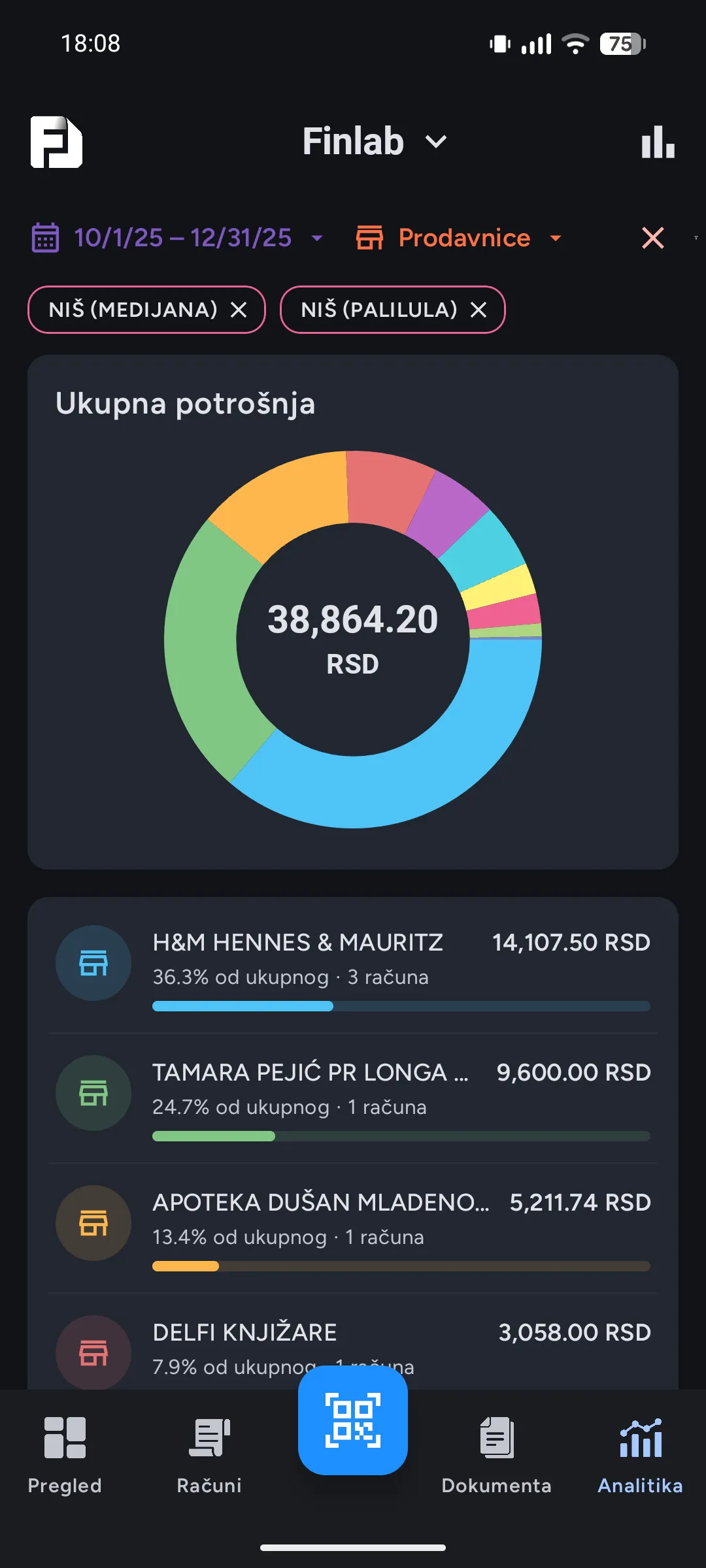
Analytics and search. Past the overview, the analytics tab drills in. Filter to one store, one category, one date range, or any combination of them, and the charts redraw against the selection. Advanced search runs the same cross-referencing over the full history: describe the expense in a line or two, and Finlab returns the matching list, down to a single receipt.
Workspaces and roles. One person can keep several workspaces, so a personal budget and a business stay cleanly apart. Workspaces are shareable, and every invitation carries a role: some members see everything in the workspace, others see only the receipts they added themselves. The result is precise control over who sees which numbers.
The workspace inbox. Every workspace has its own email address. Forward a receipt that arrived by email to that address, and it lands directly in the workspace's documents, ready to file. The forwarding habit people already have becomes a way into Finlab.
Anonymous by default. Finlab creates an account the moment a new user taps Open Account. No email, no phone number, no form. People expect a sign-up screen and instead find themselves already inside the app, account created. That is deliberate. Personal details are optional and never required, and a Finlab account stays anonymous unless the user decides otherwise. For a product that holds financial data, anonymous is the right default.
The business side. Accountants get their own web app. From it they see every client in one place, invite new ones with an invitation code, and open, search, and download any client's documents. They message clients directly, trigger the sync, and configure how Finlab hands documents to their accounting system. As clients file documents, the records flow through, and a built-in email step delivers them straight into standard accounting software, the way that software already expects them to arrive. Comments land on the individual expense: an accountant asks what something was for, and the client answers inside the app, with the question attached to the receipt instead of lost in a thread.
One system, three apps. Finlab runs as one platform behind three surfaces: the phone app, the accountant web app, and an internal admin app the studio uses to operate it and curate the enrichment content. It was built as a platform, not a single screen.
Technical decisions
Several decisions shaped the build more than the rest.
The QR scanner. Finlab captures expenses from fiscal-receipt QR codes, which are dense and unforgiving to decode. When the product was first built, the free libraries and the platform's own scanner could not read them reliably, and licensing a third-party SDK did not work out. So Appollo41 built its own scanner on OpenCV. It took a month of focused work, it outperformed the alternatives available at the time, and it is still the scanner Finlab ships today.
One codebase, two apps. Finlab runs on Android and iOS from a single codebase, the user interface included, built on Compose Multiplatform. Reaching that point meant migrating the original Android app off its platform-specific foundations one dependency at a time, roughly fifteen substantial pieces of work covering everything from logging to networking. The payoff is that a feature is written once and ships on both platforms.
Local-first, and the sync layer. Finlab keeps its data on the device and treats that local store as the source of truth. The app works without a connection and reconciles when one returns. The sync layer that makes this safe is the heart of the architecture, and it was rewritten from the ground up for the move to a shared codebase. The same local-first conviction runs through Appollo41's work, from the offline-first construction app Capmo to the on-device database behind Primal.
Privacy-first by design. Finlab is privacy-first, and not as a setting buried in a menu. Accounts are anonymous, no personal information is collected, and financial data is never linked to a named person. This was a deliberate choice to refuse the common model of building a business on harvested user data. Because anonymous accounts mean recovery depends on a security code rather than an email address, Finlab later added an optional sign-in for users who would rather trade some of that privacy for convenience. The private default stays the default.
AI agents. In early 2026, AI agents became part of how Appollo41 ships. Working with them, the team cleared a full year of planned Finlab work in roughly three months, with the code held to the same quality bar the studio applies everywhere else.
Outcome
What shipped. Finlab 2.0 shipped in early 2026, live on Android and iOS. It is a complete product: Appollo41 uses it in production, both for personal finance and to run the studio's own books.
Where it stands. Finlab found its first users through organic discovery, including an accounting firm that adopted it and brought its own clients aboard. The product is now in active evaluation with several prospective customers, accountants and businesses among them. The work in front of it is commercial rather than technical: settling how it is priced and sold, and turning evaluations into customers.
Finlab is not a finished story, and the studio does not present it as one. What it proves does not depend on the ending: Appollo41 can take a product it owns from a first idea to a system running on phones and the web, held to the standard it sets for client work. Finlab is where the studio is its own client.
Finlab shares its local-first architecture with the rest of Appollo41's work.